
📬 USPS Commercial Mail Receiving Agency (CMRA)
Notice about CMRA’s
To offer private mailbox rentals, USPS approval is required.
Steps to Apply
- Create an account on the USPS Business Customer Gateway – USPS.com® – Registration
- Fill out a form 1583-A (Application to Act as a Commercial Mail Receiving Agency), sign it, bring two forms of ID, and obtain your local Postmaster’s signature. Retain a copy for your records.
- Wait Two weeks for the form to be processed.
- After waiting 14 business days. Log into the USPS Business Customer Gateway. In your dashboard, under mailing services, select Commercial Mail Receiving Agency (see image)
- Enter your ZIP code and select Find
- Locate your business and select Request Admin
- USPS will mail an Admin Code (valid for 25 days)
- Return to the dashboard, select Pending Admin Code, enter the code, and click Validate
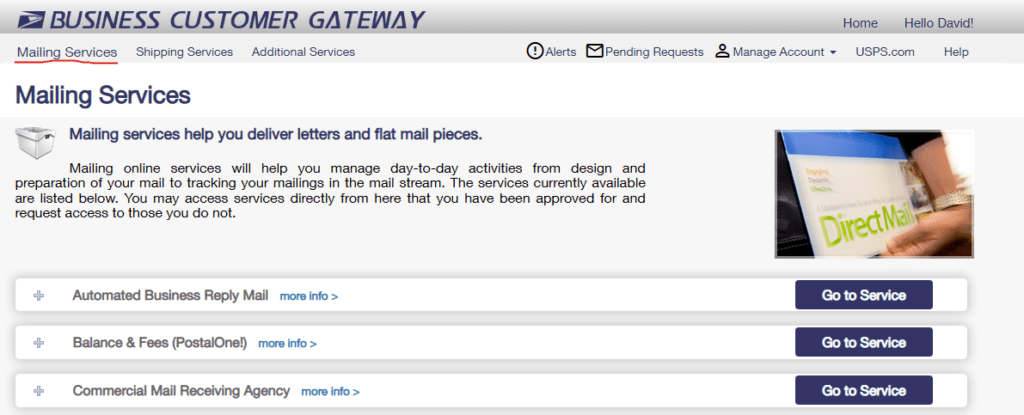
For detailed guidance, refer to the official USPS CMRA User Manual.
📦 UPS Authorized Shipping Outlet (ASO) or UPS Access Point Program
ASO Requirements
Requirements
Retail counter for customer package acceptance
Regular weekday business hours
Packing and shipping services offered on‑site
UPS packing materials provided at no charge
Acceptance of UPS drop‑off packages at no charge
Scale capable of weighing at least 100 lbs (45 kg)
Steps to Apply
- Submit an online application
- Follow up via email to asoawards@ups.com with your store details and contact information
Note: Initial application rejections are common and typically automated. If rejected, follow the recommended resubmission steps.
Alternative Option
- Schedule daily UPS pickups for approximately $36/week (no drop‑off commissions included)
Benefits of ASO Status
- Increased customer foot traffic
- Commissions on UPS shipments and drop‑offs
- Access to discounted shipping rates
- Listing on UPS’s store locator
📦 FedEx Authorized ShipCenter (FASC)
FASC Requirements
Requirements
Retail storefront with a customer counter
Calibrated scale (minimum 100 lbs capacity)
Use of an approved shipping system (e.g., FedEx Ship Manager)
Offer FedEx Express and FedEx Ground services
Meet minimum daily shipping volume
Accept FedEx drop‑offs at no charge
Registered FASCnet account
Good financial standing with FedEx
Steps to Apply
- Complete the online FASC application
- For assistance, contact 1‑800‑GoFedEx
Benefits of FASC Status
- Increased foot traffic
- Commissions on shipments and drop‑offs
- Competitive shipping rates
- Marketing exposure via FedEx’s store locator
📦 DHL Service Point Partner
Service Point Partner Requirements
Requirements
Retail storefront with signage and service counter
Dedicated secure storage for customer parcels
Space to store flat‑packed DHL packaging (approx. 140 × 120 × 70 cm)
Regular weekday and some weekend hours
Computer with internet access and printer
Steps to Apply
- Call 888‑262‑4462
- If needed, follow up via email to dasc@dhl.com
Why DHL
- Strong profit margins on international shipments
📩 Basic Shipping Supplies
Boxes
- Common sizes (e.g., 6×6×6, 8×6×4, 10×8×6, 12×12×12, 20×20×20)
- Maintain a balanced mix of sizes
Mailers & Envelopes
- Bubble mailers (#0, #1, #2, #4, #6, #7)
- Poly mailers (9×12, 12×16)
- Envelopes (#10 standard, 9×12 legal)
Other Essentials
- 4×6 direct‑thermal label rolls
- Heavy‑duty gummed packing tape
All supplies are available through your Pack & Kin Manager or Success Team.
📫 Mailboxes
- Pack & Kin Store – We offer several cost-effective options that wont break the bank!
- Salisbury – Premium, traditional style
- Craigslist / Facebook Marketplace – Cost‑effective used options
🖨️ Hardware
- Label scanner
- 4×6 label printer
- Shipping scale
Pack & Kin is hardware‑agnostic and compatible with most computers, tablets, printers, and scanners.
💳 POS Terminals
CardPointe
- Fully integrated with Pack & Kin
- Competitive processing rates included, with no additional setup requirements